AnyPicGet the app
Menu

Architecture & Home

Virtual Staging

Furnish an empty room for your listing

Virtual Staging needs an empty room. You choose room (Living room, Bedroom, Dining room and Home office) and style (Modern, Scandi, Luxury and Coastal).

Cost
From 18 credits
Model
FLUX.2 Pro Edit
Output
Your photo’s shape · 1K
Steps
3
Download on the App Store
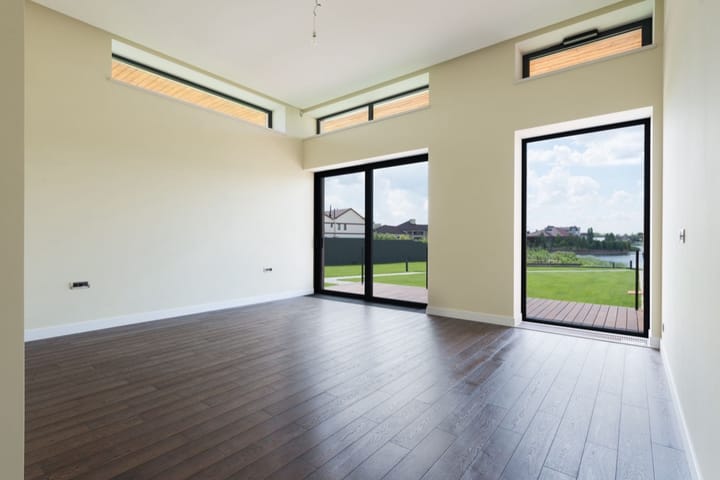
Example photo: Empty room with dark wood floors, high windows and glass doors onto a lawn
Virtual Staging result made with AnyPic

The example, side by side

Example photo: Empty room with dark wood floors, high windows and glass doors onto a lawn
Example photo · Photo: Max Vakhtbovych / Pexels
Virtual Staging result made with AnyPic
Result · FLUX.2 Pro Edit

What Virtual Staging needs

  1. Empty room

    Required
    Example photo: Empty room with dark wood floors, high windows and glass doors onto a lawn
    Example
    • Stand in a corner at chest height
    • Floor, walls and windows in frame
    • Bright daylight
    • Rooms still half full
    • Fisheye or tilted shots
  2. Room

    Choose one
    • Living room (default)
    • Bedroom
    • Dining room
    • Home office
  3. Style

    Choose one
    • Modern (default)
    • Scandi
    • Luxury
    • Coastal

Starts at 18 credits for one image on the free plan. The exact cost is shown before you tap Create, and if the generation fails, the credits are refunded automatically.

All trends · How trends work

Make your own Virtual Staging.

Get AnyPic for iPhone from the App Store. New users start with 50 welcome credits, every AI action shows its cost before it runs, and failed generations are refunded automatically. Questions first? Read the answers.

Download on the App Store